What a limited-role employee can and cannot do
Open your Inbox after signing in and selecting your business. Your role and enabled products determine access.
Who this guide is for: EMPLOYEES (teammates who work the inbox), and owners or administrators who want to know exactly what a limited seat experiences. No special permission is needed to read it — but the journey it describes is the limited seat's own view.
How the product enforces a limited seat: the navigation itself is the permission map, reads stay available, every write is refused with the scope it needs named in plain words, and tenant boundaries hold even against hand-crafted requests.
About the pictures. The fixture seat
u-bob, the tenantb-alphaand the two seeded conversations in the pictures come from an isolated synthetic test run behind this guide — not live customer traffic, and no live WhatsApp/Meta message was sent anywhere in the run.Plan note. This is a multi-seat journey. The Basic plan is one person including the owner and one WhatsApp number — there is no second seat to limit on Basic. Limited roles apply to plans that carry teammate seats; and as everywhere, Basic is messaging-only with no bots and no AI.
Step 1 — The navigation is already the permission map
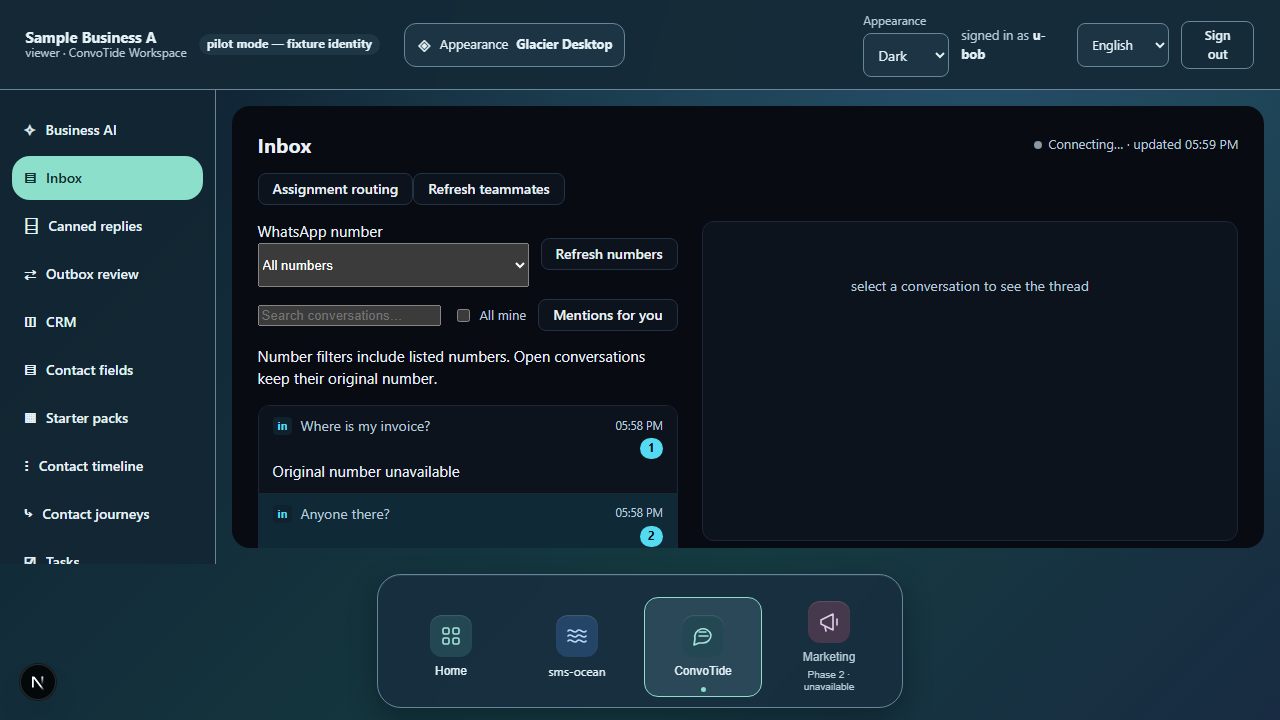
The viewer seat (u-bob) signs in and sees Inbox and Analytics —
and the admin-only surfaces (Seats, Onboarding, Migration,
API keys, Subscription) are simply absent from the navigation. What
you cannot do, you are not shown a door to.
Step 2 — Assigned reads still work
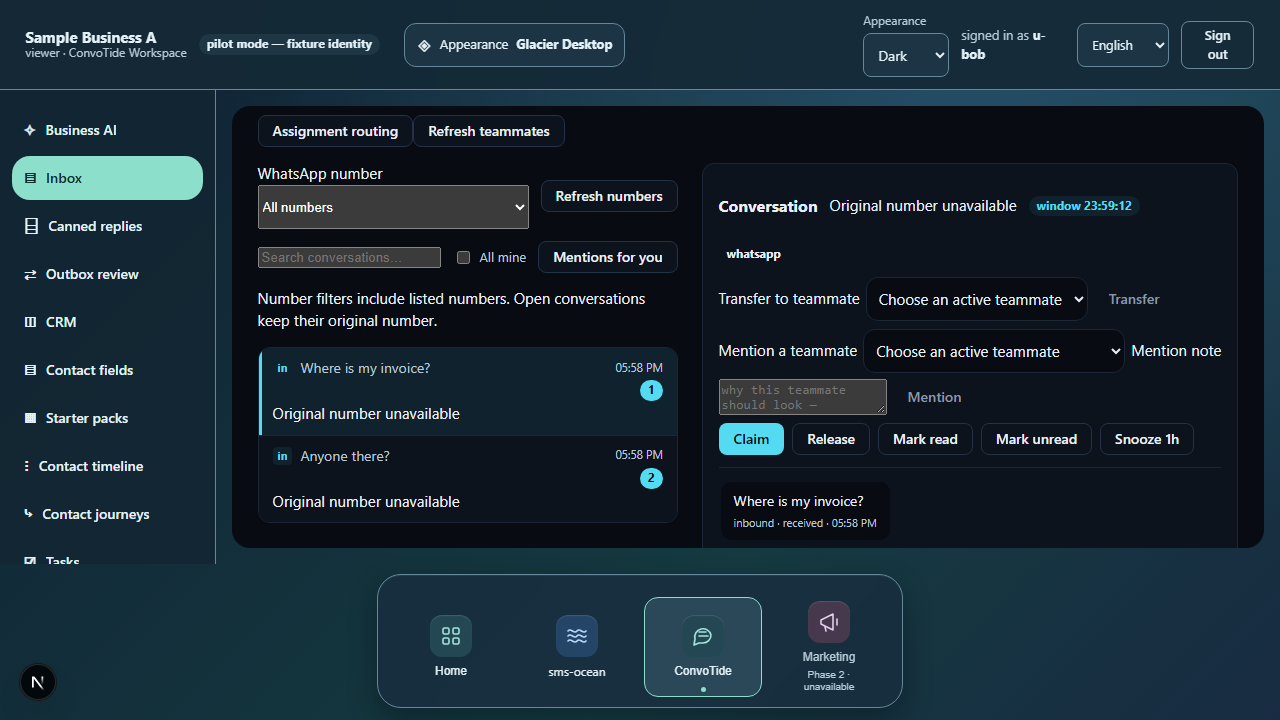
The shared inbox renders the tenant's conversations and a thread opens read-only — the seat's permissions expand what is readable, never what is writable.
Step 3 — Writes are refused, with the missing scope named
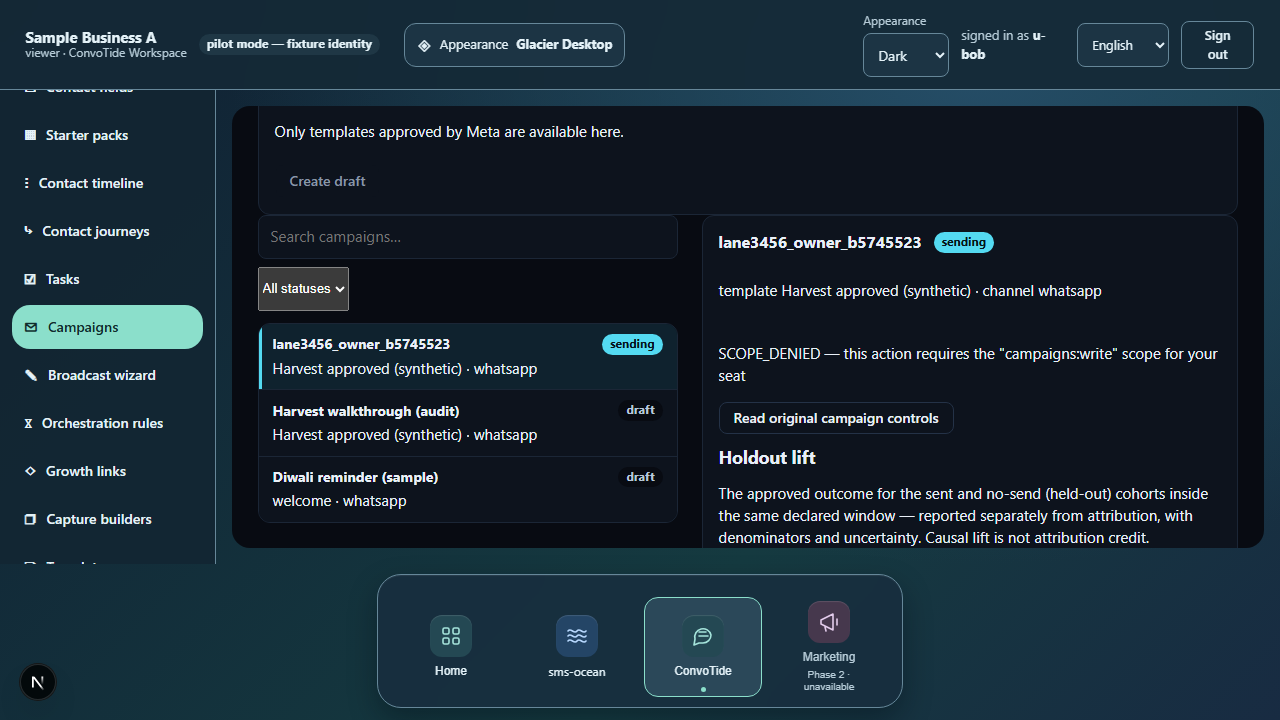
The campaigns list opens (reads allowed). Pressing a campaign lifecycle control triggers an authorization precheck that the service refuses inline, verbatim:
SCOPE_DENIED — this action requires the "campaigns:write" scope for your seat
Retrying answers the same refusal again — there is no silent pass-through
and no client-side guesswork standing in for the server. Direct API calls
agree: POST /v1/campaigns and POST /v1/templates both answer 403
SCOPE_DENIED with the same wording.
Step 4 — Tenant boundaries hold against crafted requests
Two boundary probes were exercised:
- pinning a request to a foreign org answers
403 MEMBERSHIP_REQUIRED— membership, not role, is checked first; - asking for a foreign org's campaign under this seat's own org pin
answers
404 NOT_FOUND— deliberately indistinguishable from a campaign that does not exist, so the boundary leaks no existence information.
Step 5 — The session survives a reload
After a mid-session reload the employee session survives and the workspace re-enters at Inbox — limited permission never means fragile sign-in.
Step 6 — The same refusals on a phone
At 390 px the workspace, inbox and the campaign write refusal behave the same; viewport width changes nothing about the permission contract.

If you see an error
| What you see | What it means | What to do |
|---|---|---|
SCOPE_DENIED — this action requires the "campaigns:write" scope for your seat |
Your seat does not carry the write scope this action needs; the refusal comes from the server, not the form | Ask an administrator for a seat/role that carries the scope — retrying changes nothing |
403 MEMBERSHIP_REQUIRED (a crafted request pinned to a foreign org) |
You are not a member of that organization; membership is checked before role | The boundary is working as designed; no action |
404 NOT_FOUND (a foreign org's campaign under your own org pin) |
The campaign does not exist under your organization — deliberately indistinguishable from a missing one | The boundary is working as designed; no action |
What this guide does NOT claim (kept honest)
- Admin-side seat and role management — changing a seat's role, inviting seats and revoking them are administrator surfaces; the owner-side invite/revoke leg exists in the journeys lane's owner evidence and is documented in the seat invite/revoke guide. The wider seats/settings area remains without its own documented journey.
- No successful write anywhere — by design; the journey proves the refusals, not a workaround.
- Bot surfaces for the viewer — not part of this journey.
- No Main-built runtime — the run is lane-recorded on the journeys branch, pending Chief acceptance and Main integration.
Where the receipts live
| What | Where |
|---|---|
| Final-run screenshots (this guide's images, byte-exact) | C:/CT-ZCODE-BATCH3456/journey-artifacts/final-run/lane3456-C/ |
| Per-leg records with verbatim refusals | …/final-run/lane3456-C/journey-results.json |
| Journeys lane ledger (receipt mapping) | C:/CT-ZCODE-BATCH3456/lane-journeys-ledger.json |
| Playwright results of the final 3-pass run | …/final-run/results.json, …/final-run/journeys-combined.json |
| Guides lane ledger of record | C:/CT-ZCODE-BATCH3456/lane-guides-ledger.json |
Evidence record (kept for honesty). Written from the final passing run
of the BATCH3456 journeys lane (journey C, employee viewer seat), recorded
2026-10-24T12:29Z — 3 journeys passed together in one chromium run,
exit 0 — on the journeys lane branch codex/zcode-3456-journeys @
9d2136cb (fresh Main358 base). All 9 employee legs passed; per-leg
records with the verbatim refusal wording are preserved in
C:/CT-ZCODE-BATCH3456/journey-artifacts/final-run/lane3456-C/journey-results.json
(screenshots in the same directory, copied byte-exact into this guide's
assets). Lane ledger of record:
C:/CT-ZCODE-BATCH3456/lane-journeys-ledger.json. All of it is local
candidate evidence — Chief acceptance OPEN, Main integration OPEN, and
nothing here is a live claim. Carried into this corpus from sibling
branch codex/zcode-3456-guides and rewritten to this corpus's customer
instruction standard on 26 October 2026; every fact, verbatim message and
receipt above is preserved from the source chapter.