Copying a bot
Who this guide is for: customer ADMINISTRATORS — copying needs a seat with bot-management permission.
When a bot works well, Copy duplicates it as a brand-new draft in one click — useful for per-language bots, per-region variants, or a safe experiment copy. This guide shows the copy journey on desktop and on a phone, the permission refusal a regular member seat meets, and the recovery.
Plan prerequisite. Copying bots needs a plan that includes bots and a seat with bot-management permission (an administrator). The Basic plan is messaging-only and excludes bots and AI for all seat roles. See the Basic plan refusal in Bot capacity, saved versions and rollback.
About the pictures and examples. All screenshots come from an isolated, synthetic test business used for product acceptance testing. Bot names like "zc3067 copy source" and keywords are simulated test data created by the runs. Copying sends no messages and touches nothing outside the bots list.
Step 1 — Copy a bot on desktop
- Open Bots from the workspace navigation.
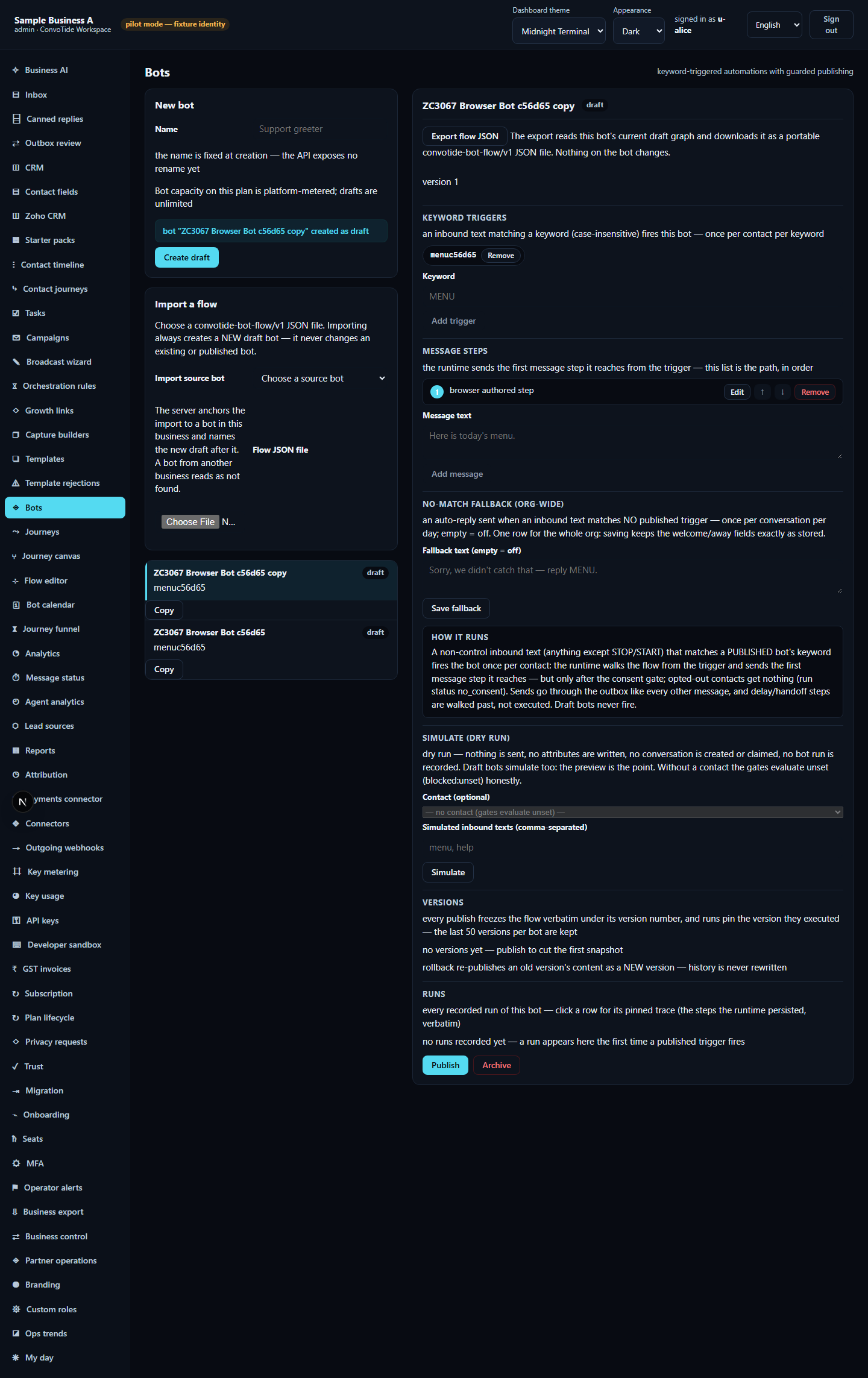
- Find the bot you want to duplicate and click the Copy button on its row.
- A new row appears immediately, named after the original with " copy" appended (for example "zc3067 copy source copy"), marked draft, and the form area confirms, verbatim: "bot "<name> copy" created as draft".
- The copy is a genuinely new bot: the runs verified it received a new bot id (never the original's), that the original's row and content were left unchanged, and that the keyword column on the new row already shows the source bot's keyword.
Step 2 — Open the copy and check what travelled
Click the copy's row. The editor opens with the copy's name and its graph intact: the trigger chip carries the source keyword and the message step carries the source text. The API-level run verified the copy in the database node for node: every step of the source graph exists in the copy with fresh node ids, and the connections between steps are the same shape — the copy is deep, not a stub.
Step 3 — It persists
Reload the page and reopen Bots: both rows — original and copy — are still there, and the copy still opens with its trigger and message. The runs verified persistence against the database, not just the screen.
Step 4 — Copy on a phone
At phone width (390px) the navigation sits behind the Menu button:
- Tap Menu, then Bots.
- Tap Copy on the source bot's row. Exactly one new row appears.
- Tap the new row — the editor opens on the copy with its trigger and message.
- Reload again while still on the phone: everything persists, and the original bot is untouched. The runs verified the page fits the phone with no sideways scrolling.


If your seat is refused
Copy is an administrative action. A regular member seat that presses Copy sees an inline refusal (a SCOPE_DENIED / 403 error in the form area), and no new row appears — the runs verified the list count was unchanged.
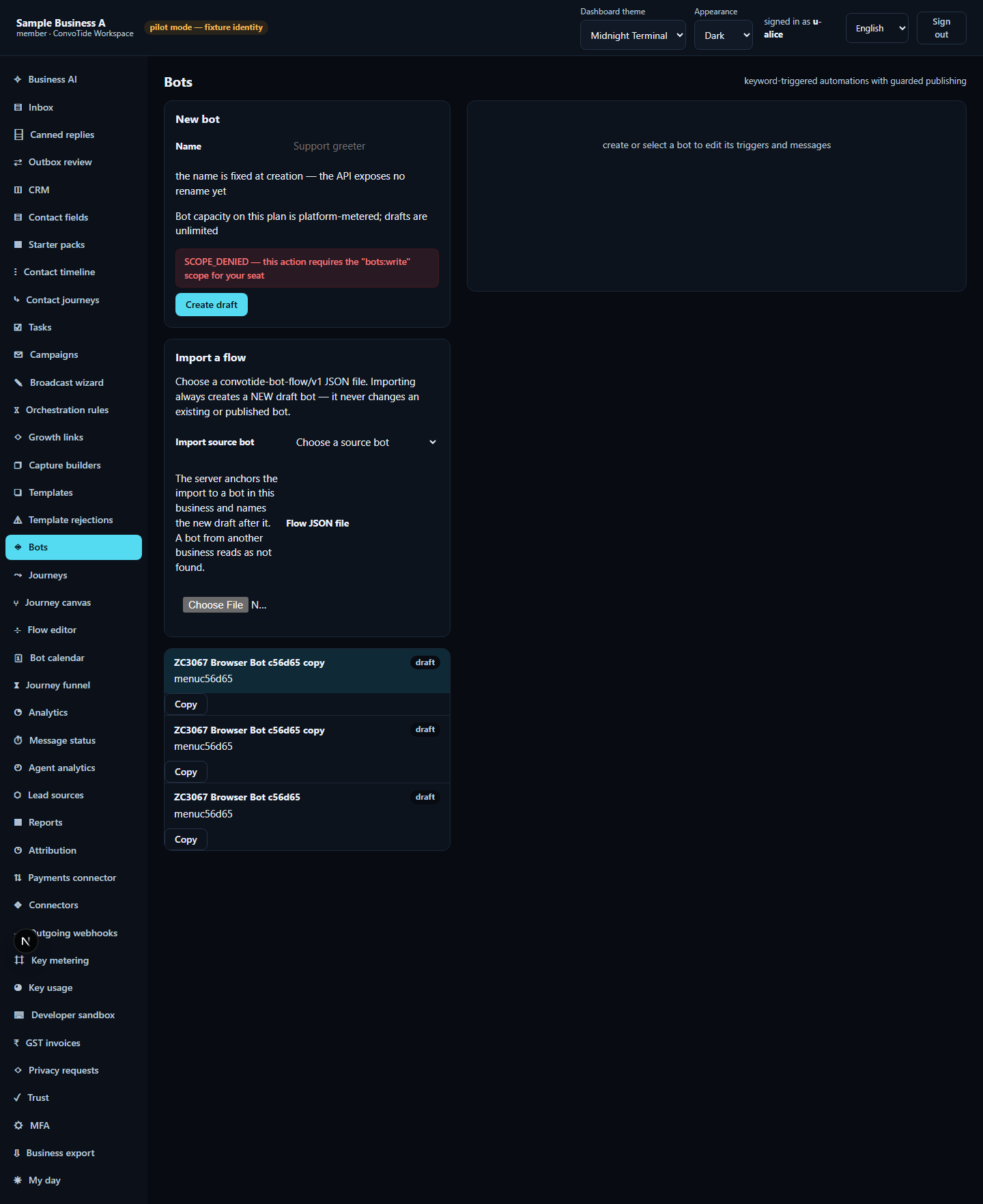
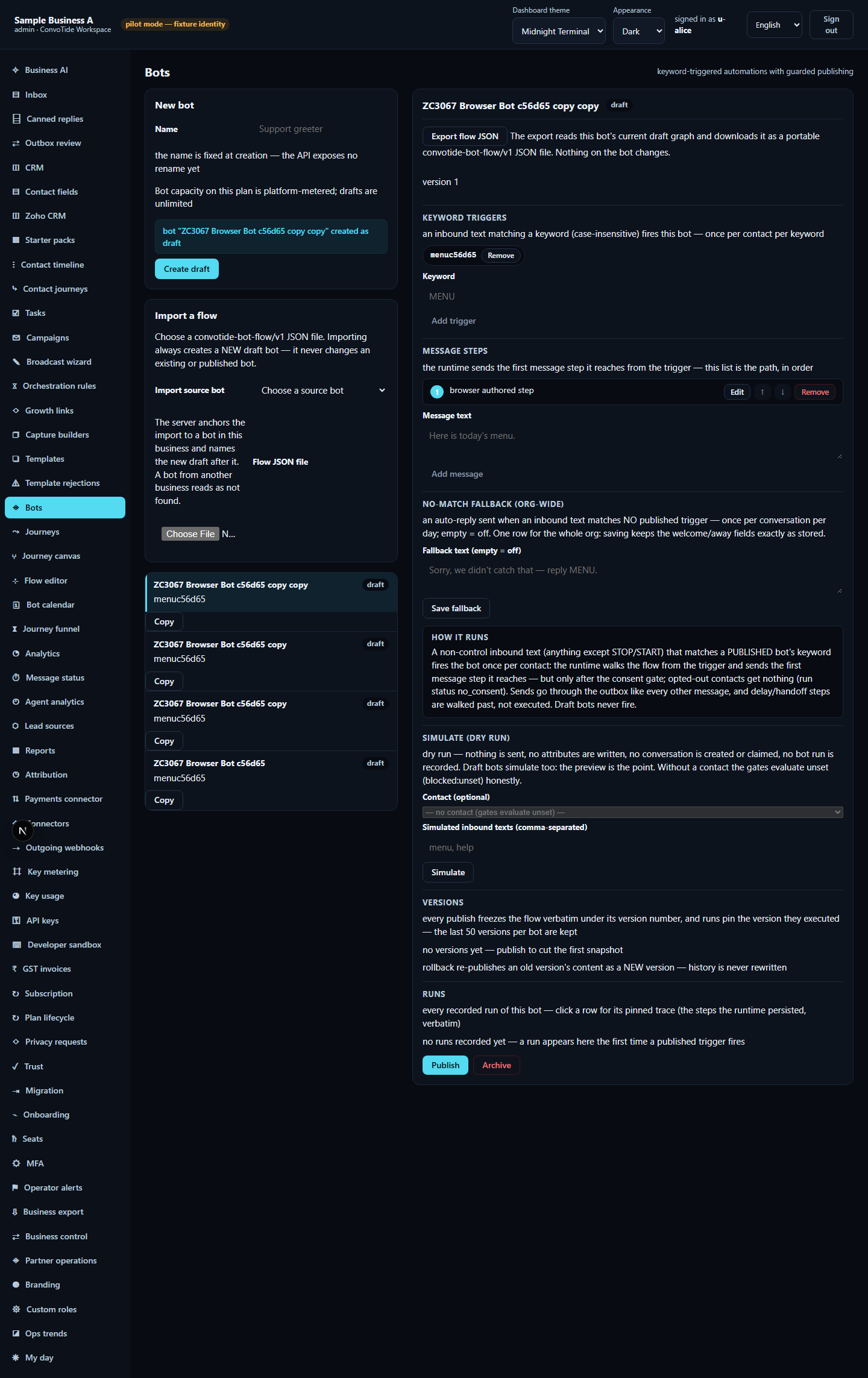
Recovery: use a seat with bot-management permission — and remember the permission only helps on a plan that includes bots. On the Basic messaging-only plan, bots and AI are excluded at the plan level, so changing your seat's role cannot unlock Copy (see the BOTS_NOT_IN_PLAN refusal). In the run, the administrator then pressed Copy on the same row and the copy appeared normally, exactly one new row.
The API-level run also verified two more guards: a copy request with an empty name is refused (bad request) and creates no row, and a request naming a bot outside your business is refused.
Interface words in all five languages
The interface ships with five languages. The evidence runs used English; the other values below are the product's own built-in translations at the tested revision, so you can recognise the same control in your language.
| English (as tested) | हिन्दी | ਪੰਜਾਬੀ | मराठी | ગુજરાતી |
|---|---|---|---|---|
| Copy | कॉपी करें | ਕਾਪੀ ਕਰੋ | कॉपी करा | કૉપી કરો |
| Bots | बॉट | ਬੋਟ | बॉट | બોટ |
What this guide does NOT claim (kept honest)
- The runs exercised copying a draft bot with one trigger and one message step. Copying a published bot, copying bots with richer graphs (button choices, question steps, CRM/API steps), renaming or deleting the copy, and publishing the copy were not exercised in these runs and are not described beyond what the interface shows.
- No live WhatsApp/Meta message was sent or delivered; all data is simulated test data.
- This guide does not claim whole-product completion or equivalence with any other provider set.
Evidence record (kept for honesty). From the completed ZC3132 bot lane —
run browser-run4 (23 October 2026, 3 of 3 passed) of
zc3067-bot-copy-real-browser.test.ts for the browser journey, and run
api-pg-run1 (2 of 2 passed) of zc3067-bot-copy-api-pg.test.ts for the
deep content and refusal checks, both executed on the real app with a real
browser, the real API and an isolated throwaway database (a local candidate
— not Main-built, not live). Lane evidence ledger:
C:/CT-ZCODE3132/lane-bot-cont-ledger.json; screenshot checksums in
assets/publish-copy-ASSETS-MANIFEST.json.
Current standing: at authoring time (23 October 2026) Chief acceptance of
the lane was open. Independent review
CT-BOT-REVIEW3144 has since accepted
the bot local candidate at HEAD 23aecb51afdac01e67ae25d5e07f76c432ed8d07
for the F1–F3 remedies and these bounded copy outcomes — the browser
copy journey (fixture: one trigger plus one message), the API deep-copy
fixture (trigger plus two chained messages) with fresh node ids and matched
topology, the refusals and the recovery. It does not assert arbitrary-graph
or published-bot copy fidelity. The guide claims only what the recorded
passing runs show.