Reading the Spend insight card — monthly category changes, anomaly flags and projection
Who this guide is for: customer ADMINISTRATORS and team leads who watch the business's messaging usage on the Analytics screen (the screen needs the analytics-read permission).
This guide shows what the Spend insight card on the Analytics screen tells you for one billing month: how your billable message counts moved per category against the prior month, which movements are flagged as anomalies under a versioned rule printed on the card itself, and the honest linear projection of the in-progress month. One thing the card never shows: money. It counts messages only — never currency, never a balance.
About the pictures. The month
2026-10, the category rows and every count in the picture come from an isolated synthetic test run behind this guide — not live customer traffic, and no live WhatsApp/Meta message was sent anywhere in the run.Honest standing of this card. The route behind it (
GET /v1/analytics/spend-insight?period=YYYY-MM) is not yet mounted in the app's route table on Main; mounting is reserved to the Chief via the lane's mount patch 1 (C:/CT-ZCODE-BATCH3456/app-ts-mount-patches/README-app-ts-mount-patches.md). Until that mount lands, a Main-built stack answers the card's request with 404 — and the card is built to say exactly that rather than invent a trend (see Step 6).
Step 1 — Open Analytics and find the Spend insight card
The card sits on the Analytics screen under the title Spend insight, with a Month (UTC) input and a Refresh button.
Step 2 — Enter the month and refresh
Type the month as YYYY-MM — the field is UTC, because billing months are.
For an invalid format the card refuses with, exactly:
Enter the month as YYYY-MM (UTC).
Nothing is fetched with a malformed month, and the previous honest state stays on screen; a corrected month recovers without a reload (both exercised in the 9/9 run).
Step 3 — Read the scope line
For 2026-10 the run rendered:
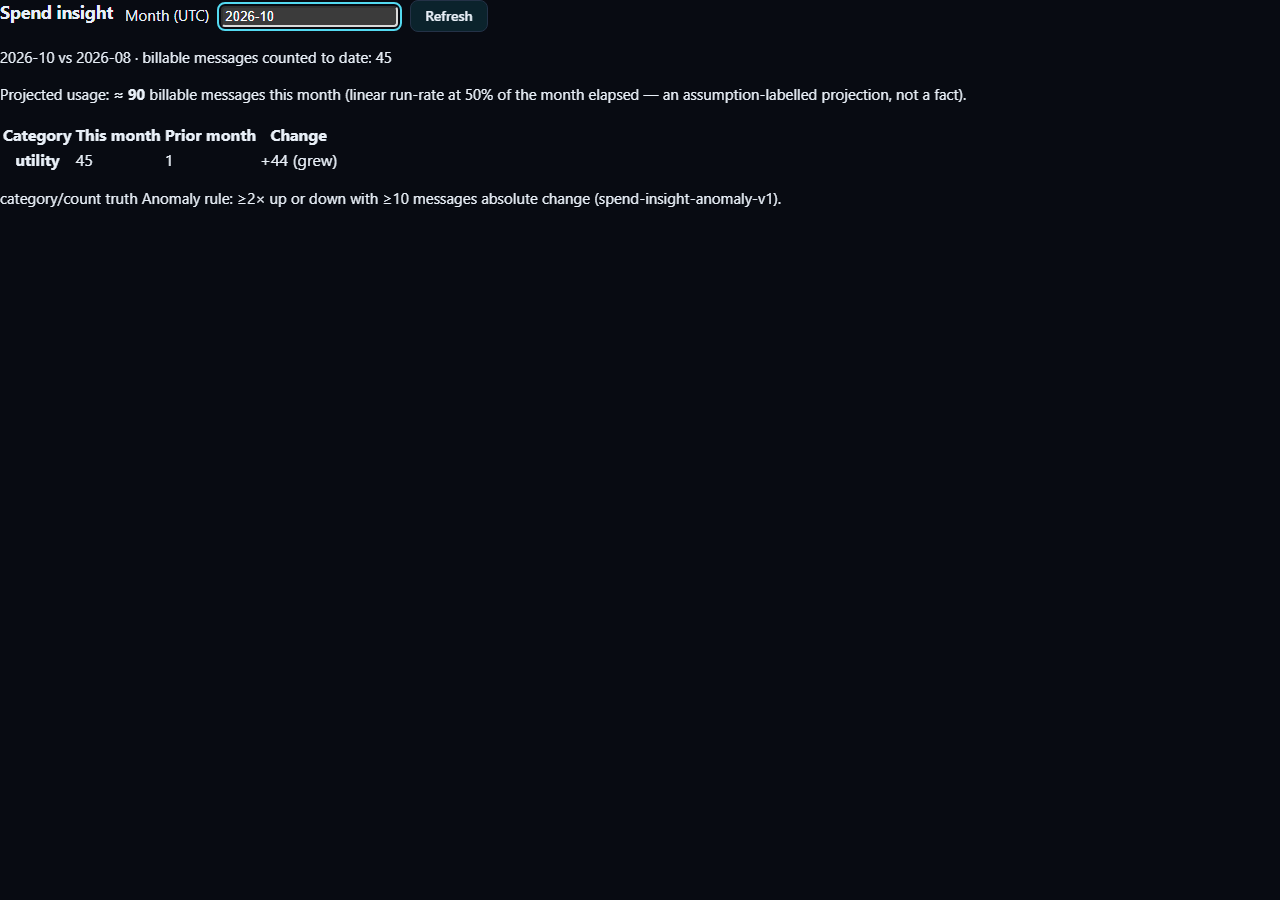
2026-10 vs 2026-08 · billable messages counted to date: 45
The comparison month is the prior month with billable activity — here August, when September had none. The count is to date: mid-month it only counts what has happened.
Step 4 — Read the category table and the anomaly flags
Each row is one spend category with This month, Prior month and
Change. The change cell names what happened using fixed wording —
first seen this month, stopped this month, grew, shrank or
steady — plus the multiple (· 2.4×) when the ratio is meaningful. A
movement that satisfies the versioned rule gets a badge: anomaly flag
(spend-insight-anomaly-v1). The rule, printed on the card itself so it can
never be a secret:
Anomaly rule: ≥2× up or down with ≥10 messages absolute change (spend-insight-anomaly-v1).
first seen this month and stopped this month rows are never flagged
— a category appearing or ending is normal lifecycle, not an anomaly.
Step 5 — Read the projection, labelled as an assumption
For an in-progress month the card renders, exactly in this shape:
Projected usage: ≈ 90 billable messages this month (linear run-rate at 50% of the month elapsed — an assumption-labelled projection, not a fact).
When the month is complete the card says so instead of projecting: "This month is complete — its own count is the result; there is nothing to project." With no billable activity in either month it says: "No billable activity in either month yet — no category changes to surface."
Step 6 — What the card does when the report is missing
If the API build does not expose the spend-insight report (today's honest state on any Main-built stack until the Chief mount lands), the card shows:
This API build does not expose the spend-insight report yet — nothing is shown rather than an invented trend.
A 403 clears the card with a permission error; a 401 hands the session back to sign-in. None of these states leaves stale numbers on screen — the request-ownership pattern makes a slow older refresh unable to overwrite a newer answer.
If you see an error
| What you see | What it means | What to do |
|---|---|---|
Enter the month as YYYY-MM (UTC). |
The month field is malformed; nothing was fetched | Correct the format and the card recovers without a reload |
This API build does not expose the spend-insight report yet — nothing is shown rather than an invented trend. |
The API build (for example a Main-built stack before the Chief mount) has no spend-insight route; it answers 404 | Nothing to fix on your side — the card refuses to invent a trend until the route is mounted |
| The card clears with a permission error | The request answered 403 — your seat lacks the analytics-read permission | Sign in with a seat that carries the permission |
| You are handed back to sign-in | The request answered 401 — the session is no longer valid | Sign in again; no stale numbers are left on screen |
Plan note
The Basic plan is messaging-only — one person including the owner, one WhatsApp number, no bots and no AI. Spend insight counts billable messaging usage, so it stays meaningful on Basic, but do not read the categories as higher-plan capabilities you hold: bot-run message categories, for example, cannot occur on Basic at all.
What this guide does NOT claim (kept honest)
- No money, currency or balance anywhere — the card shows counts only, by design; wallet and billing surfaces were not part of this journey.
- No multi-month navigation beyond the single queried month and its computed prior month.
- No live/Main-built runtime — the route is lane-built and Chief-mount pending; the 404-unsupported state is what any Main stack honestly shows today.
Where the receipts live
| What | Where |
|---|---|
Fresh UI run, 9/9 (this guide's image, byte-exact) — UI-RESULT.json, f3-card-final.png, run.log, UI-CLEANUP.json; the run binds zero TCP ports and uses no PostgreSQL (stated in its UI-CLEANUP.json) |
C:/CT-ZCODE-BATCH3456/evidence/guides3456/spend-insight-card/ |
Impl lane PG/HTTP receipts — lane commits 6b5a4f25 → a1876660 (3474 remedies) → f4cce051 (3493/3495 remedies, lane final) |
evidence/spend-insight-pg-http-REMEDY.log on codex/zcode-3456-impl @ f4cce051 |
| Impl lane pure-heuristic receipt | evidence/spend-insight-pure-REMEDY.log (same branch) |
| Anomaly regression, preserved red → green (the fault-sensitive regression that once mis-flagged anomalies) | evidence/3495-ORIGINAL-RED.log, evidence/3495-REMEDY-GREEN.log (same branch) |
| Binding JSON (commit→evidence) | C:/CT-ZCODE-BATCH3456/evidence/REMEDY3495-BINDING.json |
| Chief mount seam (patch 1) | C:/CT-ZCODE-BATCH3456/app-ts-mount-patches/README-app-ts-mount-patches.md |
| Lane ledger of record | C:/CT-ZCODE-BATCH3456/lane-guides-ledger.json |
Evidence record (kept for honesty). Written from (1) the BATCH3456
implementation lane's spend-insight work — the route exercised against a
throwaway PostgreSQL cluster with real HTTP answers, red-then-green
regression preserved — and (2) this guides lane's fresh component run
(2026-10-24T12:31Z): the committed UI spec re-run end-to-end, 9/9 cases
passed (out-of-order responses, invalid input, recovery, 404/403/401,
unmount, accessibility). All of it is local candidate evidence on the
worker lane branch — Chief acceptance OPEN, Main integration OPEN, and
nothing here is a live claim. Carried into this corpus from sibling
branch codex/zcode-3456-guides and rewritten to this corpus's customer
instruction standard on 26 October 2026; every fact, verbatim message and
receipt above is preserved from the source chapter.